Free Minecraft launcher
Launch your
Minecraft in a few clicks.
No zip files, no “which Java do you have?”, no wrestling with Forge. Pick a version or a modpack — the launcher sets everything up and gets you onto the server.
Three steps from download to your first block
No forum guides needed. The launcher walks you through and shows what it’s doing.
Install the launcher
The Windows installer is under 10 MB. The launcher sets up Java, game versions and folders on its own.
Build your game
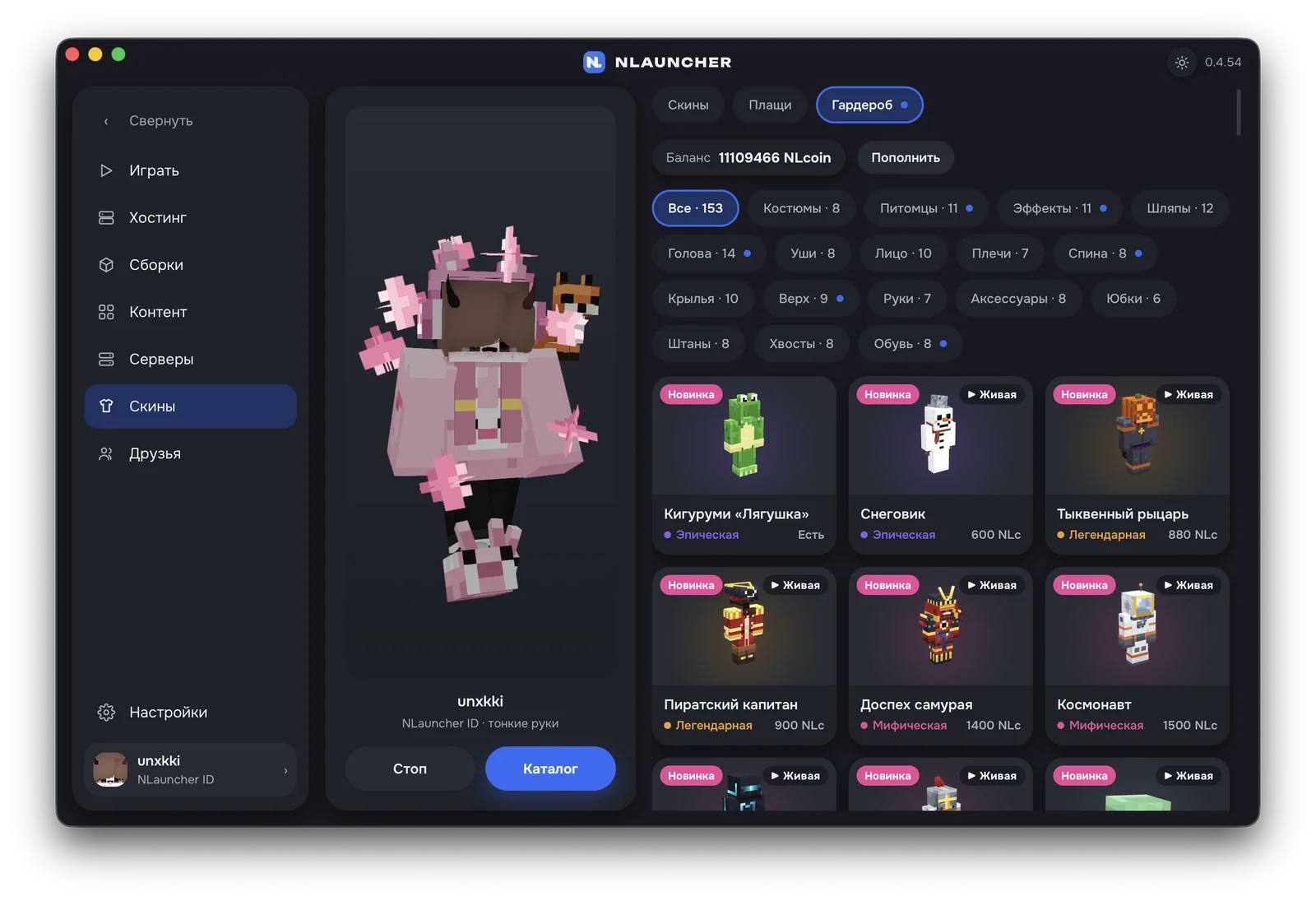
Version, mods and shaders live in your modpack; your skin and wardrobe items live in your account.
Join a server
“Play” on a server launches the right version with that server at the top of your list. Playing with a friend? Hit “Join” and their modpack installs itself.
Top servers
Players, ping and versions — live from the NLauncher server list.
The game adapts to you, not the other way around
Your skin, cape, wardrobe items and emotes are tied to your account — sign in on any PC and everything’s there. Move a modpack with mods and shaders using a code.
NLauncher — a free Minecraft launcher with mods, skins and servers
NLauncher runs Minecraft: Java Edition on Windows, macOS and Linux. Pick a version or a modpack — the launcher downloads the game, the right Java and the mod loader, and you can join a server with one button.
Every Minecraft version
More than 75 versions from 1.7.10 to 26.x: 1.12.2, 1.16.5, 1.20.1, 1.21 and newer. Vanilla, Forge, NeoForge, Fabric and OptiFine.
Mods and modpacks in one click
A Modrinth and CurseForge catalog with compatibility checks, .zip and .mrpack import, modpack updates with rollback.
Servers and hosting
A server list with live player counts and ping, one-click Play, and your own server in a couple of minutes.
Skins, wardrobe, emotes
Skins up to HD 128×, capes, 3D items and emotes — other NLauncher players see them in game.
Friends and calls
Friends, messages and voice calls with screen sharing right in the launcher, plus “Join” to hop onto a friend’s server.
Crash Doctor
If the game crashes, the launcher shows what caused it and offers a fix — no digging through forums.
Frequently asked questions
Is NLauncher free?
Yes. The launcher, every game version and every modpack in it are free. NLcoin, the in-launcher currency, is optional and only buys cosmetics (wardrobe items, emotes, catalog capes) and server rental on NLauncher Hosting.
Which Minecraft versions can I play?
More than 75 versions of Minecraft: Java Edition, from 1.7.10 to 26.x: vanilla, Forge, NeoForge, Fabric and Forge with OptiFine. The launcher downloads the right Java from Mojang’s official runtime for you — no hunting for Java or installing it by hand.
Do I need a Minecraft license?
You can sign in three ways: with a Microsoft account that owns Minecraft, with a free NLauncher ID (skins, capes, friends, wardrobe and emotes) or just with a nickname. Servers that check for a Microsoft license only let in Microsoft accounts.
How is NLauncher different from TLauncher?
Both launchers run any version of Minecraft Java, install Forge and Fabric and support custom skins, so switching feels familiar. NLauncher builds more into the launcher itself: a Modrinth and CurseForge catalog of mods and modpacks with compatibility checks, modpack import and updates with rollback, a server list with one-click join, a 3D wardrobe and emotes, friends and voice calls, and Crash Doctor, which tells you why the game crashed. It runs on Windows, macOS and Linux and updates itself. You can try it next to any other launcher — NLauncher keeps the game in its own folder.
Is NLauncher safe to download?
Only download it from the official page nlauncher.net/en/download. Launcher updates are signed with an Ed25519 key, so a tampered update won’t install; game files are checked against SHA-1 hashes from Mojang’s manifest; sign-in tokens are kept in the system vault (Credential Manager, Keychain, Secret Service), not in plain text on disk.
The Windows installer isn’t signed by Microsoft yet, so SmartScreen may warn you: click “More info” → “Run anyway”.
Which systems does the launcher run on?
Windows 10 and 11 (64-bit), macOS 12 or newer — one installer for Apple Silicon and Intel — and Linux: AppImage and .deb for Ubuntu 24.04+, Debian 13+, Fedora 40+ and Arch. Your account, skins and wardrobe items are the same on every system.
How do I play Minecraft with mods?
Open the Modpacks catalog: a ready-made modpack installs in one click — the launcher downloads the version, the loader and every mod for you. Or build your own: pick a version, Forge, Fabric or NeoForge and mods from Modrinth and CurseForge — dependencies are added automatically. You can also import a CurseForge (.zip) or Modrinth (.mrpack) modpack archive.
Download and jump into the game.
The Windows installer is under 10 MB. No ads, no bundled junk, and the launcher updates itself.