How to make your own emote
Make an animation in Blockbench — or take your own emote from Emotecraft — and upload it to NLauncher. The launcher converts the file, shows the emote on your skin, and once it’s reviewed it goes into your wheel. Moderators publish the best ones to the “From players” catalog — with your name on them.
Make the animation
The easiest way is Blockbench with the GeckoLib Animation Utils plugin (File → Plugins) and the Emotecraft player model — Emotecraft’s guide: Creating Emotes With Blockbench.
- Animate the
head,torso,right_arm,left_arm,right_leg,left_legbones; thebodybone moves the whole model (jumps, flips, crouches). - Elbows and knees: the
right_arm_bend… bones or thebendvalue — NLauncher keeps the bend and the mod draws it in game. - Save the animation as
.json(Animation → Export). A ready Emotecraft emote works too — a.jsonor.emotecraftfrom theemotesfolder.
Upload it in the launcher
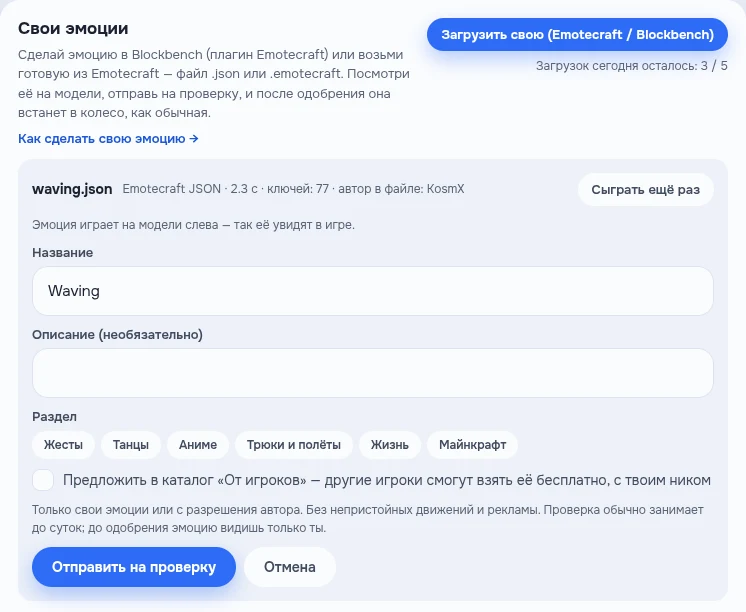
NLauncher → Appearance → Emotes → Mine → “Upload your own (Emotecraft / Blockbench)”. The launcher converts the file and plays the emote on the model on the left right away — that’s how others will see it in game. If something can’t be carried over (an item in hand, say), the launcher tells you.
Name the emote, pick a section and, if you want to share it, tick “Suggest it for the From players catalog”.
Wait for the review
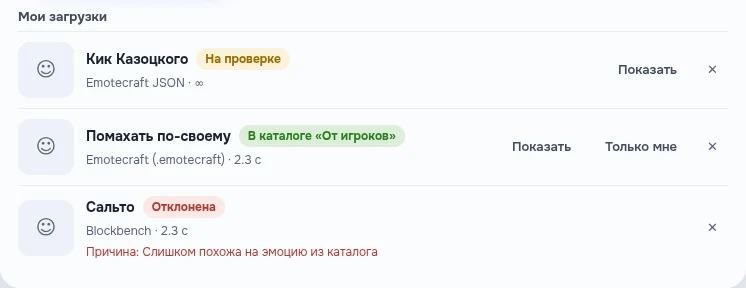
A moderator checks the emote — usually within a day. Until then only you can see it. The status is right there in “My uploads”: under review, approved (private — only yours), in the From players catalog or rejected with a reason. You get a notification with the answer.
Play
An approved emote is in “Mine”: drag it to a wheel slot and hold B in game. Every player with the NLauncher mod on the same server sees it. Anyone can take emotes from the “From players” catalog for free — the author’s name is shown on them.
Good to know
- Up to 30 seconds, file up to 256 KB; up to 5 uploads a day and up to 3 under review at once.
- Parts: head, torso, arms, legs and the whole model, plus elbow and knee bends. Items in hand and per-part scale aren’t carried over; a torso bend becomes a lean.
- Emotecraft easings (sine, quad, cubic, expo, back, elastic, bounce…) are carried over within a fraction of a degree; MoLang expressions aren’t supported — numbers only.
- Upload only your own emotes or ones you have the author’s permission for. Other people’s packs (SPEmotes, for example), obscene moves and ads in the name are rejected.